
Appearance
Send Transactional Email
Legacy endpoint. New integrations should use the Transactional Emails resource instead. Quick guide
To send a transactional email, use the following URL pattern:
https://api.bluefox.email/v1/send-transactionalReplace the placeholders with your specific information:
##EMAIL_ID####YOUR_API_KEY##
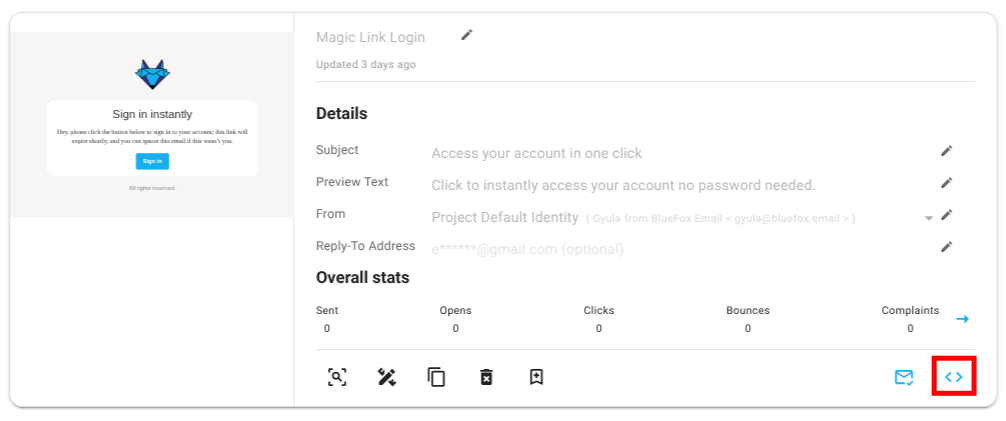
You can find the required IDs by clicking the Code Guide button on a transactional email card:
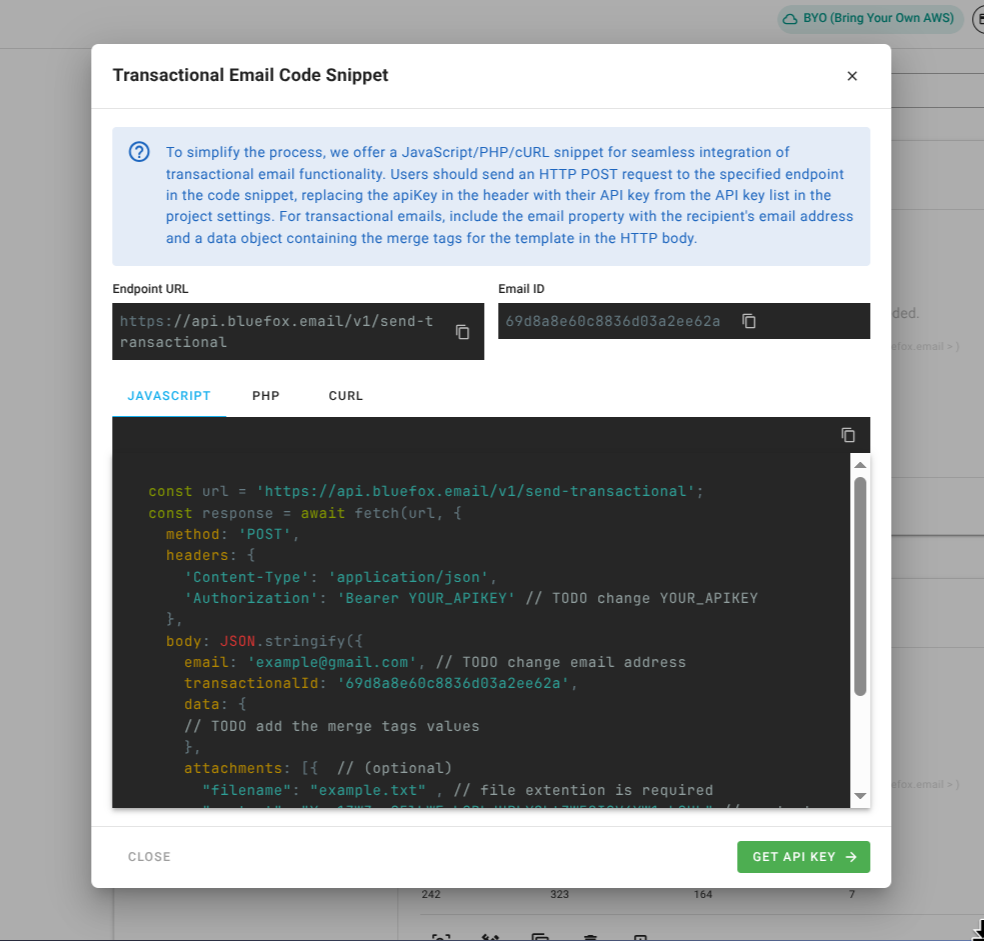
In the Code Guide dialog, these values are automatically filled in. If you copy the code snippets, make sure to replace ##YOUR_API_KEY##.
Request Body
json
{
  "email": "jon@doe.com",
  "transactionalId": "##EMAIL_ID##",
  "data": {
    "example": "example merge tag value"
  },
  "attachments": [] // optional
}
You can include personalization data (merge tags) in the data object. These tags are processed by Handlebars when the email is sent.
cURL Example
bash
curl -X POST \
"https://api.bluefox.email/v1/send-transactional" \
-H "Content-Type: application/json" \
-H "Authorization: Bearer ##YOUR_API_KEY##" \
-d '{
  "email": "jon@doe.com", // TODO: Change email address
  "transactionalId": "##EMAIL_ID##",
  "data": {
    // TODO: Add merge tag values
  }
}'
JavaScript Example
javascript
const url = 'https://api.bluefox.email/v1/send-transactional';

const response = await fetch(url, {
  method: 'POST',
  headers: {
    'Content-Type': 'application/json',
    'Authorization': 'Bearer ##YOUR_API_KEY##' // TODO: Replace ##YOUR_API_KEY##
  },
  body: JSON.stringify({
    email: 'jon@doe.com', // TODO: Change email address
    transactionalId: '##EMAIL_ID##',
    data: {
      // TODO: Add merge tag values
    }
  })
});
PHP Example
php
$apiKey = "##YOUR_API_KEY##";

$url = "https://api.bluefox.email/v1/send-transactional";

$email = "example@gmail.com"; // TODO: Change email address
$transactionalId = "##EMAIL_ID##";
$data = [
  // TODO: Add merge tag values
];

$payload = json_encode([
  "email" => $email,
  "transactionalId" => $transactionalId,
  "data" => $data
]);

$options = [
  "http" => [
    "header"  => [
      "Content-Type: application/json",
      "Authorization: Bearer $apiKey"
    ],
    "method"  => "POST",
    "content" => $payload,
  ],
];

$context  = stream_context_create($options);
$result = file_get_contents($url, false, $context);
API Responses
| Code | Name | Message | Description | JSON Response Example |
|---|---|---|---|---|
| 200 | - | - | The request was successfully processed. | json { "status": 200 , "result": {"success": true} } |
| 400 | VALIDATION_ERROR | Project Email AWS configurations not found. | Missing AWS configurations in project. | json { "status": 400, "error": {"name": "VALIDATION_ERROR", "message": "Project Email AWS configurations not found."} } |
| 400 | VALIDATION_ERROR | Missing required parameters: email and transactionalId. | The request is missing mandatory fields for processing. | json { "status": 400, "error": {"name": "VALIDATION_ERROR", "message": "Missing required parameters: email and transactionalId."}} |
| 400 | VALIDATION_ERROR | Invalid email format | The request contains improperly formatted email. Ensure email is valid email address. | json { "status": 400, "error": {"name": "VALIDATION_ERROR", "message": "Invalid email format"} } |
| 405 | METHOD_NOT_ALLOWED | Insufficient credits available. | Occurs when the account lacks the necessary credits to send an email. | json { "status": 405 , "error": {"name": "METHOD_NOT_ALLOWED", "message": "Insufficient credits available."} } |
| 405 | METHOD_NOT_ALLOWED | The provided email has been flagged due to bouncing. If this is incorrect and the email is valid, please contact support. | The email address has been marked as undeliverable due to previous failed delivery attempts. | json { "status": 405, "error": {"name": "METHOD_NOT_ALLOWED", "message": "The provided email has been flagged due to bouncing. If this is incorrect and the email is valid, please contact support."} } |