
Appearance
BlueFox Email vs MailerSend: Head-to-Head Comparison
Selecting an email service provider is a critical decision that directly impacts your business's communication reliability and growth trajectory. Both BlueFox Email and MailerSend serve the email delivery market but with fundamentally different approaches to infrastructure, pricing, and user experience. Whether you're building transactional email systems for your application or managing marketing campaigns, understanding each platform's strengths and weaknesses will guide you toward the right choice for your specific requirements.
In this comprehensive comparison, we'll evaluate both platforms, examining design capabilities, integrations, automation, deliverability, analytics, support, and pricing to help you make an informed decision. We'll highlight where each platform excels and where potential limitations might affect your email strategy, ensuring you have the complete picture before committing to a solution. Numbers reflect public pricing and documentation as of October 2026.
Platform Positioning
MailerSend has established itself as a modern transactional email service provider that bridges the gap between developer-focused APIs and the needs of non-technical team members. Born from the established email marketing company MailerLite, it leverages over a decade of high-volume sending experience. Its core strength lies in its team-friendly approach, offering an intuitive UI and a drag-and-drop builder that empowers marketers and designers to manage templates without developer intervention.
However, MailerSend's user reviews reveal several challenges. The platform operates on a shared IP infrastructure by default, which means your sender reputation can be affected by other users' sending practices. Dedicated IPs are available, but only for Enterprise accounts sending more than 100,000 emails per week. A more significant issue highlighted by users is a strict and often opaque account approval and suspension process, which can lead to abrupt service interruptions without clear explanation. This concern remains a recurring theme in 2026 user reviews across G2, Capterra, and Trustpilot.
BlueFox Email takes a focused approach designed for marketing agencies, SaaS companies, and organizations that prioritize email design quality, delivery control, and infrastructure transparency. Built as a control panel on top of either its own managed infrastructure or your own AWS SES account, it provides consistent feature access across all plans. For advanced users, BlueFox Email offers an optional "bring-your-own-AWS-SES" mode that operates on top of the user's own AWS Simple Email Service (SES) account, giving full, isolated control over sender reputation, plus twice the sends on every plan and pack at the same price. BlueFox Email uses usage-based billing (monthly plans from $6/month excl. VAT, or one-time send packs), consistent rendering across email clients (including Outlook), and the same feature set on every plan.
Both platforms serve growing businesses and technical teams, but they differ in their underlying philosophy. MailerSend offers a self-contained, user-friendly solution, while BlueFox Email provides transparent infrastructure with optional AWS-powered control.
Email Design and Templates
MailerSend
MailerSend provides a user-friendly platform with three distinct editors: a drag-and-drop builder, a rich-text editor, and a custom HTML editor. This approach is designed to be team-friendly, enabling non-technical users to create professional and responsive emails using pre-built content blocks and templates without coding knowledge. The platform supports dynamic templates for personalization, allowing a single template to be populated with unique data for each recipient.
While functional and easy to use, some reviews suggest the design capabilities have limitations compared to more specialized tools. The drag-and-drop builder is considered functional but not as flexible for complex layouts as some alternatives. The platform also lacks a comprehensive, built-in design system for enforcing global brand styles across multiple templates, a feature critical for maintaining consistency at scale.
Strengths: Intuitive drag-and-drop interface for non-technical users, multiple editor options (drag-and-drop, rich-text, HTML), and a gallery of pre-built templates. Offers split testing for transactional emails, a rare feature in its class.
Trade-offs: The builder can be less flexible for complex designs. Lacks a unified design system for managing reusable brand components globally.
BlueFox Email
BlueFox Email offers three ways to build an email: a Visual Editor (drag-and-drop, built on the Chamaileon SDK), a Raw HTML editor for writing or pasting your own markup, and a Plain Text editor. No HTML is required if you use the Visual Editor, though a Custom Code block is also available there if you need to drop in a snippet the visual canvas doesn't natively support.
In the Visual Editor, emails are assembled from blocks, reusable full-width sections like headers, footers, and CTA rows that you save once and reuse across templates, plus basics (reusable design tokens like colors, fonts, images, text snippets, and URLs) and components (buttons, dividers, etc.) that you can override at the project level to keep templates on-brand. These reusable blocks and basics are specific to the Visual Editor; an email built in Raw HTML or Plain Text can't be saved back as one of these reusable templates.
Personalization runs on Handlebars merge tags, with Loop and Conditional elements for repeating or conditionally showing content based on contact or API data. The editor also includes a shared image library, a built-in stock photo gallery, a photo editor, dark mode preview, and a VML-based fallback to keep background images working in Outlook.
Strengths: Three editors to match your workflow (Visual, Raw HTML, Plain Text), reusable blocks and project-level basics for consistent templates, Handlebars personalization with loop/conditional elements, built-in stock photos and a photo editor, dark mode preview.
Trade-offs: A smaller pre-made template library than more established services. The Handlebars syntax for advanced personalization has a slight learning curve for non-technical users. Reusable blocks and basics only apply to emails built in the Visual Editor.



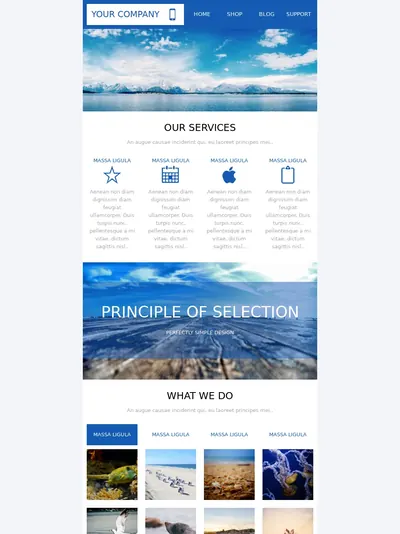

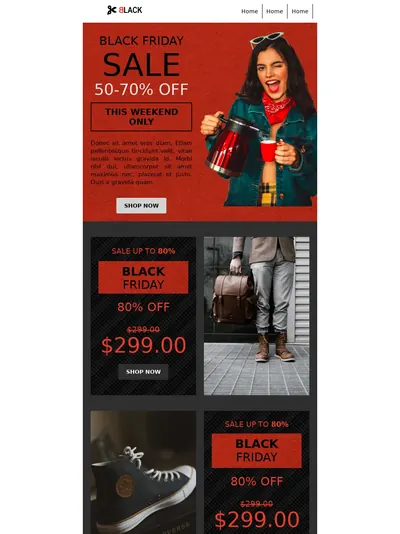



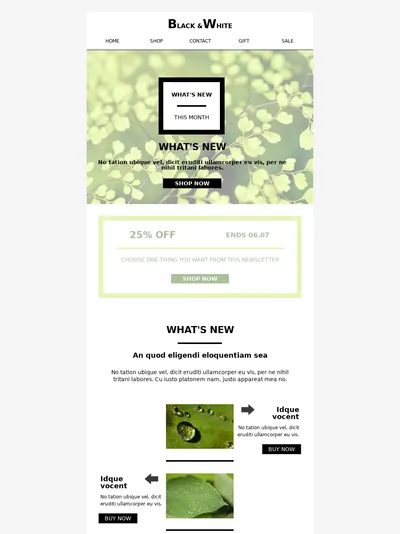
Template 1 of 10: Marketing Agency Newsletter
Integrations
MailerSend
MailerSend provides a comprehensive and well-documented RESTful API for developers to integrate email and SMS functionality into their applications. The platform offers seven official SDKs (Node.js, Python, Java, PHP, Laravel, Go, and Ruby), making it accessible for various development environments. For simpler setups, a straightforward SMTP relay is also available, and the platform also offers an MCP server for connecting MailerSend to AI tools.
The platform features robust webhook capabilities for real-time event tracking and offers native integrations with popular services like WordPress, WooCommerce, Firebase, and Supabase, along with Zapier and Make connectivity for thousands of additional app connections. The official WordPress SMTP plugin is particularly useful for solving common deliverability issues on that platform.
Strengths: Well-documented API, seven official SDKs, simple SMTP relay, an MCP server for AI tooling, and a good range of native and third-party integrations.
Trade-offs: Lower plan tiers cap the number of webhooks and API tokens (one webhook on Free and Hobby, 50 on Starter), which can constrain more complex setups until you upgrade.
BlueFox Email
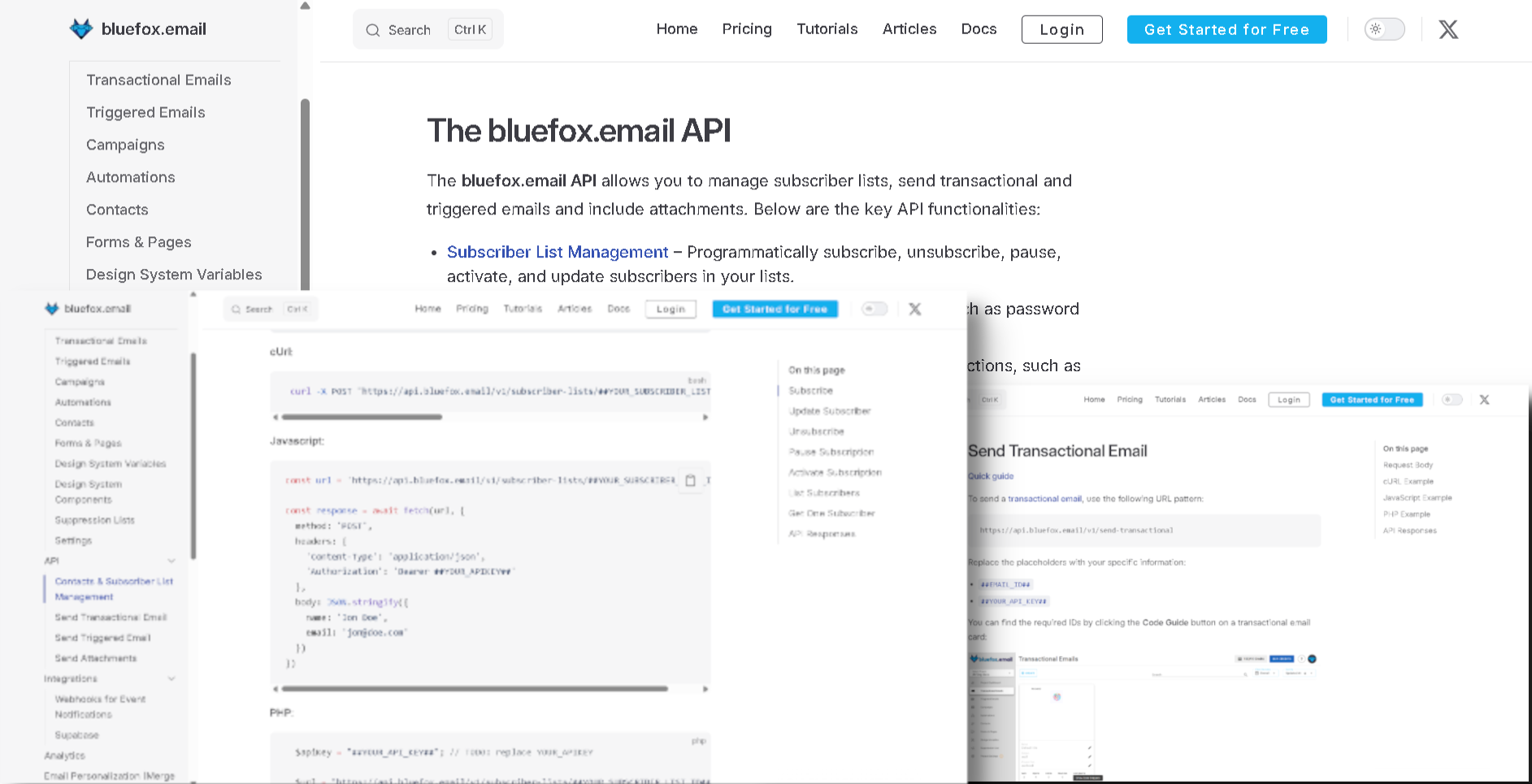
BlueFox Email is built with an API-first approach, offering an API (https://bluefox.email/docs/api/) for subscriber list management (subscribe, unsubscribe, pause, activate), transactional and triggered sends, and attachments. For teams requiring maximum control, an optional "bring-your-own-AWS-SES" mode connects directly to the user's AWS SES account via secure Access Key or STS credentials, giving developers direct visibility into the email delivery pipeline.
Webhooks push real-time events: sent, failed, opens, clicks, bounces, complaints, subscribe, unsubscribe, pause, and resubscribe. Direct integrations are a Zapier connector (no coding required), a guide for routing Supabase Auth emails through BlueFox Email's SMTP (https://bluefox.email/docs/integrations/supabase), and a local MCP server for connecting AI agents like Claude Desktop, Claude Code, Cursor, or Windsurf to a project.
Strengths: API-first design with subscriber-list, transactional, and triggered endpoints. Full webhook event set on every plan. Supabase-native auth email path via SMTP, no-code Zapier integration, an MCP server for AI-agent access.
Trade-offs: A small native integration list: Supabase, Zapier, and the MCP server are the only first-party integrations, alongside webhooks. No native e-commerce or CRM connectors. Initial API implementation requires some technical knowledge.
Automation
MailerSend
MailerSend's automation capabilities are centered on API-based triggers and webhook-driven workflows rather than a visual marketing automation builder. It is designed for sending transactional sequences like welcome series or password resets, which are triggered by events in an application. For more complex, visual workflows, users typically rely on third-party integrations with platforms like Zapier or Make.
This focus on transactional automation means MailerSend is not an ideal choice for businesses that need a single platform for complex, multi-step marketing campaigns with visual branching and conditional logic. Its strength lies in reliable, trigger-based messaging, not in building sophisticated customer journeys.
Strengths: Reliable for API-triggered transactional email sequences. Integrates with Zapier and Make for no-code workflow creation.
Trade-offs: Lacks a built-in visual automation builder for creating complex marketing workflows. Not suitable for users needing an all-in-one marketing and transactional automation platform.
BlueFox Email
BlueFox Email's visual automation builder lets you create multi-step workflows without coding. Trigger types include Contact Added, Contact Updated (with from/to property conditions), Enter Segment, Leave Segment, and Time Based (recurring schedules such as daily, weekdays, weekly, monthly, or monthly on a relative day, like the first Monday of every month).
You can build automation flows using various node types:
- Send Email nodes for delivering targeted messages
- Timer nodes for scheduling precise delays between steps
- Audience Filter nodes for branching based on contact properties, segment membership, or email engagement
- Branching nodes with Condition sub-nodes for multiple decision paths
- Notify, Set Value, and Manage Tags nodes for alerting your team and updating contact data mid-flow
- Webhook nodes for pushing automation activity to an external URL
- Complete nodes to define where contacts exit the flow, plus Exit Criteria to leave the flow early based on a property, segment, or email activity
Running automations can be updated and the change applied to upcoming-only or upcoming-and-in-progress contacts, so intervals, email order, or content can be adjusted without rebuilding the flow from scratch. All automation features are available on every plan without restriction.
Strengths: Flexible visual automation builder with live editing of running flows and early-exit criteria. All features are available on all plans, including the free tier.
Trade-offs: Limited number of pre-built automation templates, requiring users to construct most workflows from scratch.
Deliverability and Infrastructure
MailerSend
MailerSend is built by a team with over a decade of deliverability experience from MailerLite and emphasizes its ability to reach the inbox. The platform manages its own sending infrastructure, which operates on shared IP pools by default. This means a user's sender reputation can be influenced by the practices of other customers on the platform. Dedicated IP addresses are available to help isolate reputation, but only for Enterprise accounts sending more than 100,000 emails per week.
The platform provides essential authentication tools (SPF, DKIM), DMARC monitoring, blocklist monitoring, and suppression list management to maintain list hygiene. However, a recurring theme in negative user reviews is the strict account vetting process, which can lead to sudden suspensions, often with unclear reasons provided, creating a significant point of friction for legitimate businesses. Some users have also reported aggressive, automatic rate-limit reductions tied to reputation changes.
Strengths: Backed by an experienced deliverability team. Offers standard authentication, DMARC and blocklist monitoring, and list management tools.
Trade-offs: Uses shared IP infrastructure by default, with dedicated IPs reserved for high-volume Enterprise accounts. The stringent and sometimes opaque account suspension process is a significant risk for businesses.
BlueFox Email
Every BlueFox Email project starts in sandbox mode, which works immediately with no AWS account needed, and can move to production mode once your domain is verified and your sending practices are reviewed. For advanced users, an optional "bring-your-own-SES" mode operates as a layer on top of the user's own AWS SES account; in this mode sender reputation is completely isolated and only affected by your own sending practices, and every plan and pack includes twice as many sends at the same price.
To stay in production, projects need to keep bounce rate below 2.5% and complaint rate below 0.05%, shown live in the project dashboard. Bounced and complained addresses are added to a per-project suppression list automatically, and teams can also manually add or CSV-import other problematic addresses to prevent re-sending. A subscription preferences page and one-click unsubscribe (RFC 8058) are included on every plan. An optional dedicated IP add-on is available for managed sending at $50/month (excl. VAT), requested by email, with no Enterprise tier or minimum volume required; in BYO SES mode, a dedicated IP is instead configured and billed through your own AWS SES account. This approach provides full transparency and, in the bring-your-own-SES mode, removes the risk of being penalized for another user's actions.
Strengths: Full infrastructure transparency, with bounce/complaint thresholds (2.5%/0.05%) visible live in the dashboard. Optional bring-your-own-AWS-SES mode provides isolated sender reputation plus 2× sends on every plan and pack for advanced users. Dedicated IP add-on at a published price for managed sending, not gated to a high-volume tier.
Trade-offs: The optional bring-your-own-SES mode requires users to set up and manage their own AWS account, which involves a more technical initial setup and separate AWS SES billing.
Analytics and Reporting
MailerSend
MailerSend provides a real-time analytics dashboard with a range of key metrics, including open rates, click-through rates, delivery rates, bounces, and spam complaints. The platform includes an activity log with advanced search and filtering, allowing users to track the status of individual emails.
However, some users have reported limitations. Activity data retention is tied to the pricing plan: 1 day on Free and Hobby, 7 days on Starter, and 30 days on Professional, extendable to 365 days as a paid add-on. That can make long-term analysis difficult on lower tiers. Some reviews also mention that the analytics can be inaccurate at times and that reporting features are more limited compared to competitors.
Strengths: Real-time dashboard with core engagement metrics and a detailed activity log.
Trade-offs: Data retention is short on lower-tier plans (as little as 1 day). Some users report inaccuracies in analytics and find the reporting less comprehensive than alternatives.
BlueFox Email
BlueFox Email scopes analytics at account, project, campaign, transactional email, triggered email, automations, and subscriber list levels. Per email: sends, opens, unique opens, clicks, unique clicks, bounces, complaints, and unsubscribes; resubscriptions and paused subscriptions are tracked separately as project- and list-level Subscription Trends rather than per-email metrics. Charts switch between hourly, daily, weekly, and monthly intervals (daily/weekly/monthly support up to a 1-year range, hourly up to 7 days). Each email's detail page includes a filterable, contact-level data table exportable as CSV. Project-level dashboard shows live bounce rate (against the 2.5% ceiling) and complaint rate (against the 0.05% ceiling). Automation cards expose Runs, Active, Sends, Opens, Clicks for the whole flow plus per-Send-Email-node breakdowns. Webhooks push every event in real time for external dashboards.
Strengths: Live bounce/complaint ratios against the production thresholds, per-email-type and per-automation-node stats with CSV export, real-time webhook push for external analytics, full event set on every plan.
Trade-offs: No revenue or ROI tracking, no industry benchmark comparison, link-click table shows per-URL click counts but no visual heatmap overlay, no built-in A/B testing reports.
Analytics
Analytics that show what happened
Delivery, opens, clicks, bounces, and subscription trends. Switch between hourly, daily, weekly, and monthly views.
Sent6,200
Failed0
Opens4,805
Unique Opens3,210
Clicks748
Unique Clicks182
Bounced8
Complaints0
Support and Learning Resources
MailerSend
MailerSend offers customer support through email and live chat, though availability varies by plan. Live chat is included on Starter plans and above, email support is available from the Hobby plan up, and the Free plan receives only limited support. Professional adds priority email support and onboarding assistance. Many user reviews praise the support team for being responsive, human, and helpful. The platform also provides a comprehensive knowledge base and API documentation to help users with integration and troubleshooting.
While many experiences are positive, some users have reported that support can feel stretched at times, with slower response times for complex issues compared to more specialized providers. The quality of support is a frequently cited positive, but the experience can vary, and the most responsive tiers of support sit behind paid plans.
Strengths: Email and live chat support, widely praised by users for being responsive and helpful. Priority support and onboarding assistance available on Professional.
Trade-offs: Live chat is gated to Starter and above, and the Free plan receives only limited support. Some users report slower responses for complex technical debugging.
BlueFox Email
As a founder-led startup, BlueFox Email provides direct access to the core development team for technical guidance and support. Founder Gyula Németh has worked in HTML email since 2013 and previously co-founded edmdesigner.com, chamaileon.io, and emailhero.io.
Support is available to every user, regardless of their plan tier, and user feedback feeds directly into the product roadmap.
Strengths: Direct access to founders and core developers. Equal support for all users on every plan.
Trade-offs: As a newer company, it has a smaller knowledge base and fewer community forums compared to established platforms.
Pricing
Both platforms price by email volume rather than contacts, which makes this a more direct comparison than most. The difference is in what each tier includes and how you pay.
MailerSend
MailerSend uses a tiered monthly subscription model based on email volume. On December 2, 2025, MailerSend restructured its entry-level plans, so any older review or comparison still referencing a 3,000-email free tier is out of date. New accounts also get a 14-day free trial of Professional features, limited to 500 emails per month.
| Plan | Price | Volume | Notes |
|---|---|---|---|
| Free | $0 (card required, not charged) | 500 emails/month | 100/day cap, 1 domain, 1 template, 1 user, 1 webhook, 100 daily API requests, 1-day data retention, limited support |
| Hobby | $7/mo | 5,000 emails | Overage at $1.50 per 1,000 emails, 5 seats, 1 domain, 10 templates, 1-day data retention, email support |
| Starter | From $35/mo ($68/mo for 100,000) | 50,000 emails | Overage from $1.30 per 1,000 (decreases at larger sizes), 5 seats, 10 domains, 250 templates, 7-day data retention, live chat |
| Professional | From $110/mo ($140 for 100,000; $275 for 250,000; $525 for 500,000; $1,000 for 1,000,000) | 50,000 emails | Unlimited users, domains, and templates, 30-day data retention, priority support, onboarding assistance |
| Enterprise | Custom | High-volume | Dedicated IPs available above 100,000 emails/week |
Paying yearly saves 10% on paid plans. The December change drew notable backlash from existing users: MailerSend's free Hobby tier (previously 3,000 emails/month) was closed to new signups on October 21, 2025, and on December 2, 2025 existing free users were moved either to the new paid $7/month Hobby plan (now 5,000 emails) or to the restricted 500-email Free plan. Many reviewers described this as a "forced upgrade."
Strengths: Low entry price with a $7 Hobby plan, predictable monthly costs for stable sending volumes, and a 30% nonprofit discount.
Trade-offs: The Free tier is now too limited for production use, and features like multiple domains, more seats, longer data retention, and live chat sit behind higher tiers. Recent changes to the free tier have caused negative sentiment among some users.
BlueFox Email
BlueFox Email charges per send, never per contact. One send is one email delivered to one recipient, and transactional, triggered, and campaign emails all cost the same. Contacts are unlimited, every plan and pack includes every feature, and sends are bought at the workspace level and shared across all projects. All prices below exclude VAT, which is applied at checkout based on your local rate.
There are two ways to pay (a recurring monthly plan or one-time send packs) and two ways to send: Standard, where BlueFox Email manages the sending infrastructure, or BYO AWS SES, which gives 2× the sends at the same price while you pay AWS directly for sending. New workspaces get a one-time allowance of 3,000 free sends on Standard pricing or 6,000 on BYO SES pricing, valid for 12 months, with no credit card required.
Monthly plans (excl. VAT)
Best for regular, steady sending.
| Plan | Price / month | Standard sends / month | BYO AWS SES sends / month |
|---|---|---|---|
| Starter | $6 | 5,000 | 10,000 |
| Basic | $9 | 10,000 | 20,000 |
| Growth | $19 | 25,000 | 50,000 |
| Pro | $35 | 50,000 | 100,000 |
| Business | $59 | 100,000 | 200,000 |
| Scale | $129 | 250,000 | 500,000 |
| Elite | $239 | 500,000 | 1,000,000 |
Each billing cycle brings a fresh sending allowance, and unused sends do not roll over. You can cancel anytime and keep using your allowance until the current billing period ends, or upgrade anytime by paying the price difference, with the new plan starting right away. On Standard, the effective rate runs from $1.20 per 1,000 sends on Starter down to about $0.48 per 1,000 on Elite; BYO SES halves that, before AWS fees.
One-time send packs (excl. VAT)
Best for occasional or unpredictable volume, or for teams that prefer to pay upfront.
| Pack | Price | Standard | BYO AWS SES |
|---|---|---|---|
| Essential | $50 | 50,000 sends ($1.00 per 1,000) | 100,000 sends ($0.50 per 1,000) + AWS fees |
| Premium | $300 | 500,000 sends ($0.60 per 1,000) | 1,000,000 sends ($0.30 per 1,000) + AWS fees |
Pack sends are valid for 12 months from the date of purchase, and you're never billed again unless you buy another pack. Packs stack with no cap, and the oldest sends are always used first, so the newest last the longest.
AWS fees (BYO SES only)
In BYO mode, AWS bills you directly for sending, separately from your BlueFox Email plan or pack. At AWS's à la carte rate of $0.10 per 1,000 emails, 100,000 sends add about $10, and every BYO figure in this comparison uses that rate.
If your AWS account is new, check which SES pricing option it's on. Since July 21, 2026, new SES accounts (and account/region combinations with no metered SES activity since June 1, 2025) start on the SES Essentials plan at $0.16 per 1,000 emails for the first 10M per month. You can switch to à la carte pricing at any time.
Dedicated IP
Teams on managed sending can add a dedicated sending IP for $50/month (excl. VAT), at any volume. The IP is reserved for your workspace, so your sender reputation depends only on your own sending. To set one up, email hello@bluefox.email. On BYO AWS SES there's nothing to buy from BlueFox Email: dedicated IPs are set up and billed in your own AWS account.
Custom volume
If you need more than the published plans and packs cover, contact sales at hello@bluefox.email. The team sets up a discovery call to plan your volume and onboarding.
How to read the scenarios
Each scenario below states its own email volume. MailerSend prices are monthly list prices from its pricing and help pages, checked October 1, 2026; paying yearly takes 10% off. MailerSend's cheaper Hobby and Starter plans gate features such as multiple domains, more seats, longer data retention, and live chat, so where those matter the scenarios compare against Professional. All BlueFox Email prices exclude VAT, and BYO SES figures include AWS fees at $0.10 per 1,000 emails.
Scenarios: monthly plans
Monthly plans suit regular, steady sending, so these scenarios compare MailerSend's monthly price with the BlueFox Email plan that fits each month's volume.
Small app or side project (5,000 emails/month):
- MailerSend Hobby: $7/month (1 domain, 10 templates, 1-day data retention).
- BlueFox Email Standard: the 3,000 free sends cover part of the first month, then Starter at $6/month (5,000 sends).
- BYO SES: the 6,000 free sends cover the first month, then Starter at $6/month (10,000 sends) plus ~$0.50 AWS = ~$6.50/month.
At this size the two are within a dollar of each other; the difference is that BlueFox Email's $6 plan includes every feature.
Steady sending, features don't matter (50,000 emails/month):
- MailerSend Starter: $35/month, capped at 5 seats and 10 domains.
- BlueFox Email Standard: Pro at $35/month (50,000 sends).
- BYO SES: Growth at $19/month (50,000 sends) plus ~$5 AWS = ~$24/month.
On managed sending this is a tie on price; BYO SES comes in lower.
Same volume, need unlimited seats and domains, longer retention, or priority support (50,000 emails/month):
- MailerSend Professional: $110/month.
- BlueFox Email Standard: Pro at $35/month, since every feature is already included and there's no separate tier to upgrade into.
- BYO SES: ~$24/month including AWS fees.
Mid volume (100,000 emails/month):
- MailerSend: Starter 100K at $68/month, or Professional 100K at $140/month.
- BlueFox Email Standard: Business at $59/month (100,000 sends).
- BYO SES: Pro at $35/month (100,000 sends) plus ~$10 AWS = ~$45/month.
High volume (500,000 emails/month):
- MailerSend Professional 500K: $525/month. At this volume (about 115,000 emails a week), a dedicated IP means moving to an Enterprise quote.
- BlueFox Email Standard: Elite at $239/month (500,000 sends).
- BYO SES: Scale at $129/month (500,000 sends) plus ~$50 AWS = ~$179/month.
Very high volume (1,000,000 emails/month):
- MailerSend Professional: $1,000/month on the 1M tier, or about $925/month staying on the 500K tier and paying $0.80 per 1,000 for the extra 500,000 emails.
- BlueFox Email Standard: the largest monthly plan, Elite ($239), covers 500,000 sends; at 1,000,000 a month, contact sales for custom volume.
- BYO SES: Elite at $239/month (1,000,000 sends) plus ~$100 AWS = ~$339/month.
Scenarios: one-time packs
Packs suit occasional or unpredictable sending. Pack sends stay valid for 12 months, so each scenario below looks at a full year. MailerSend's plans are monthly subscriptions, billed whether you send that month or not, with overage charged on anything above the plan's allowance.
Occasional campaigns (4 sends a year to 10,000 recipients each, such as quarterly updates = 40,000 emails/year):
- MailerSend Hobby kept all year: $7 × 12 = $84, plus overage in the four send months (5,000 extra emails each at $1.50 per 1,000 = $7.50 per send), so about $114/year.
- BlueFox Email Standard: one Essential pack ($50) covers the whole year, with 10,000 sends to spare.
- BYO SES: one Essential pack ($50, 100,000 sends) plus ~$4 AWS = ~$54/year.
A big send every few months (200,000 recipients every 3 months, such as a seasonal sale = 800,000 emails/year):
- MailerSend Hobby kept all year with overage: $84 plus about $292.50 of overage per send month (195,000 extra emails at $1.50 per 1,000), so about $1,254/year. Hobby's limits still allow this: its bulk endpoint takes 500 emails per request, so each 200,000-email send needs about 400 requests, under the 1,000 daily request quota, though Hobby is limited to 1 sending domain.
- MailerSend Professional 250K kept all year: $275 × 12 = $3,300/year.
- BlueFox Email Standard: two Premium packs ($600) cover the year, with 200,000 sends to spare.
- BYO SES: one Premium pack ($300, 1,000,000 sends) plus ~$80 AWS = ~$380/year.
Cost summary: At small and mid volumes on managed sending, MailerSend's Hobby and Starter plans are price-competitive with BlueFox Email: within a dollar at 5,000 emails, tied at 50,000, and about 13% more at 100,000 ($68 versus $59). BYO SES is cheaper than both throughout. Once you need Professional-tier features, BlueFox Email costs roughly 58% to 78% less at the same volume, because every feature is already included. At 500,000 emails a month BlueFox Email Standard costs about 54% less than MailerSend Professional, and for occasional senders a pack comes in roughly 50% to 70% below keeping a MailerSend plan running all year.
Where MailerSend makes sense:
- You want a straightforward email solution with a user-friendly interface that empowers non-technical team members.
- Its low-cost Hobby and Starter plans suit small-scale operations and early-stage apps that can work within feature caps such as limited domains, seats, and short data retention; at 50,000 emails a month, Starter matches BlueFox Email's managed Pro plan on price.
- You need SMS or WhatsApp messaging alongside email from the same provider.
- You prioritize simplicity and collaboration for basic transactional emails and can operate within the potential risks of a shared IP infrastructure and a strict account approval process.
- You have a small contact list with infrequent sending needs and don't require sophisticated visual automation or deep control over your sender reputation.
Where BlueFox Email is the clear choice:
- Email infrastructure transparency, predictable costs, and unrestricted feature access matter most to you.
- You want a usage-based pricing model without the feature gates of tiered plans.
- Occasional or seasonal sends: one pack can cover a whole year, with nothing billed in the months you don't send.
- You need the optional bring-your-own-AWS-SES mode for an isolated sender reputation without shared-IP risk, plus double the sends on every plan and pack.
- You want consistent, on-brand email design that renders reliably across email clients, including Outlook.
- You need a visual automation builder where running flows can be edited without rebuilding them.
- You want all features available on every plan, direct access to the development team for support, and transparent billing that scales with your actual sending volume.
Notes on both:
- MailerSend prices change with volume tier and billing period, and overage applies above each plan's allowance. Always check MailerSend's live pricing page.
- BlueFox Email prices are public, with flat monthly plans and one-time packs, all excluding VAT. In BYO mode, AWS bills sending separately; the figures here use AWS's $0.10 per 1,000 à la carte rate.
Which Fits Your Use Case
Pick by what you actually need.
| If you need… | Likely better fit |
|---|---|
| A non-technical team managing templates via drag-and-drop, rich-text, or HTML | MailerSend |
| Split testing for transactional emails | MailerSend |
| Seven official SDKs for developer integration | MailerSend |
| Native WordPress, WooCommerce, Firebase, or Supabase integrations | MailerSend |
| SMS or WhatsApp messaging from the same provider | MailerSend |
| A low-cost entry plan for small-scale or early-stage sending | Either (MailerSend Hobby $7, BlueFox Email Starter $6) |
| A choice of Visual, Raw HTML, or Plain Text editors, with reusable blocks and brand variables | BlueFox Email |
| Reliable rendering across email clients, including Outlook | BlueFox Email |
| A visual automation builder with live editing of running flows | BlueFox Email |
| Isolated sender reputation via an optional bring-your-own-AWS-SES mode, with 2× sends | BlueFox Email |
| A dedicated IP at any volume, without an Enterprise tier or minimum send count | BlueFox Email |
| Occasional sends without a monthly bill | BlueFox Email |
| Transparent, usage-based pricing with no contact-list fees and no feature gates | BlueFox Email |
| Direct access to founders and core developers for support | BlueFox Email |
Both platforms can send email well. The decision usually comes down to whether you want MailerSend's self-contained, team-friendly solution, or BlueFox Email's transparent infrastructure with optional AWS-powered control.
Evaluating other transactional providers? See how BlueFox Email compares to SendGrid, MailerLite, and Resend.
Scale Your Agency with Professional Email Solutions
Deliver pixel-perfect, on-brand emails for every client. Maintain consistency across campaigns and elevate your agency's reputation with reliable email infrastructure.